Review Deployment Contents
You get a clear and comprehensive view of all patches deployed within your environment, listing patches associated with the patch filter and active policies to facilitate easy tracking and management of patch rollouts.
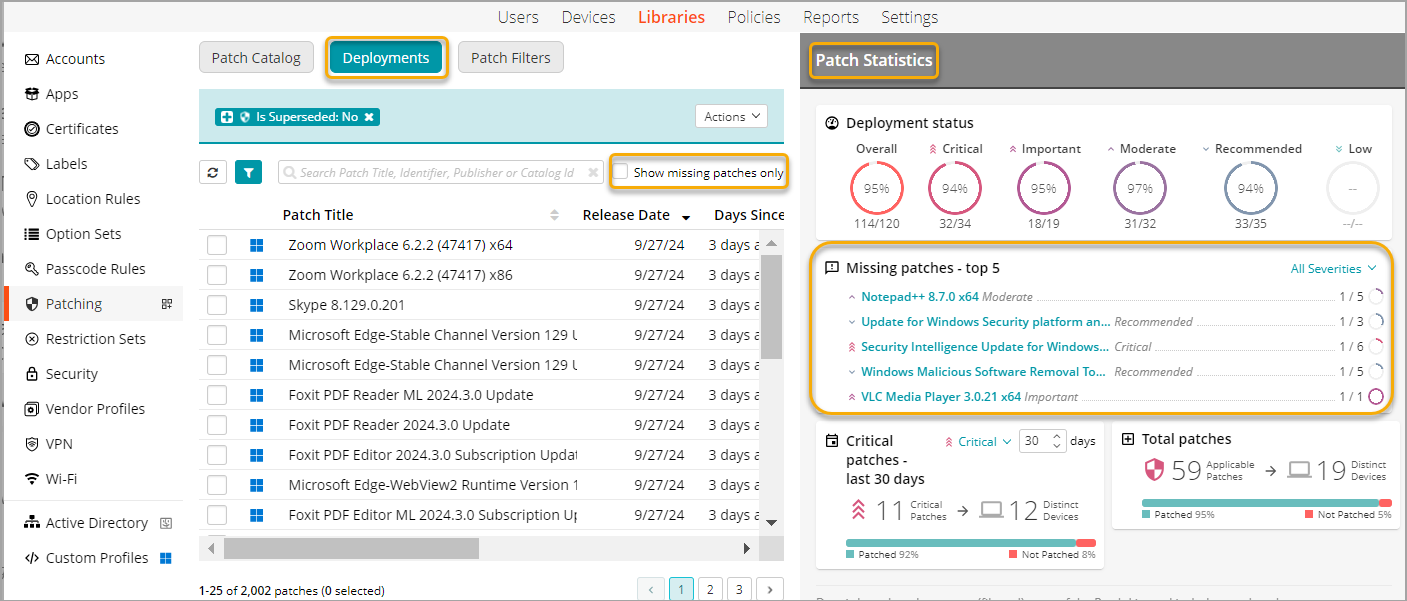
To access the Deployment tab,
- Select the Libraries tab in top navigation.
- Click the Patching icon.
- In the Patching Library that appears, open the Deployment tab.
- The patches inventory appears. By default, it lists all patches associated with the patch filter and active policies.
- From here, you can perform the following actions,
-
sort the patch list in ascending or descending order by date by clicking the following in columns:
- Release Date - Shows the release date of each patch.
- Last Deployed Date - Indicates when the patch was last deployed.
- view the missing or failed patches on the device by selecting Show missing patches only.
-
view Patch Statistics to provide information on patches applied to devices.
- displays the number of devices a patch has been applied to and any failures.
- filters statistics to highlight important patches and their status.
- click on a patch to see detailed information and view targeted devices.